Wan 3.0 AI Video Generator
Build longer audio-visual stories with native 30-second generation, rich multimodal references, precise editing and stronger creative consistency.
These capabilities come from the official Wan product page. They do not mean every option is currently available through Panify.
Wan official video
Official demos: how capabilities become shots
These videos come directly from the Wan website and illustrate multimodal references, native duration and consistency. Panify does not mark these capabilities as enabled generation endpoints yet.
Omni-Creation multimodal workflow
The official demo shows how multiple reference assets can feed one creative task, with attention to subject, environment and camera relationships.
Native 30s duration
Use a longer timeline for an opening, action, transition and closing beat when planning a complete story rhythm.
Pixel-perfect consistency
The official demo emphasizes stable reproduction of reference details; review people, products, text and physical interactions frame by frame.
The videos are copied from the official Wan website into Panify’s static R2 area; copyright remains with the original owner.
Visual examples
From reference frame to editable shot
These public examples illustrate reference-led prompting, camera motion and style transfer. They do not mean the corresponding endpoint is available in Panify.
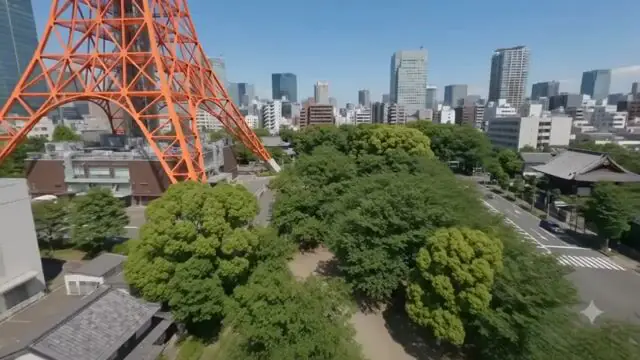
Reference-led motion
Start with a clearly composed frame, lock the subject and space, then direct movement and camera behavior in the prompt.
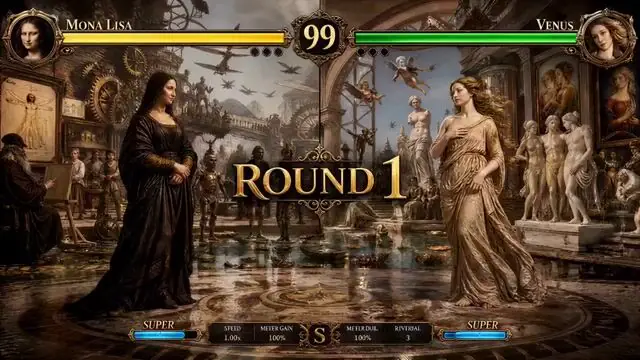
Connected shots and style
Turn art direction, camera language and pacing into a production brief that can become an editable sequence.
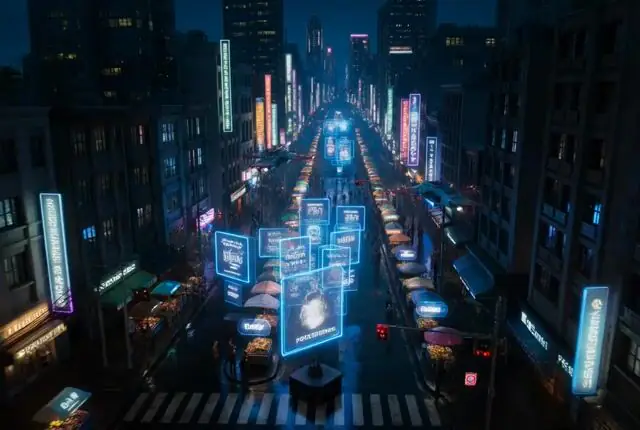
Subject and camera control
Break a complex scene into subject, camera path and environmental light instead of relying on a vague ‘cinematic’ label.

Macro detail and atmosphere
Describe changes to petals, haze and reflections so a still reference can become a short clip with intentional rhythm.
Examples are from a public Wan 3.0 demo page and are copied into Panify’s static R2 area for capability illustration only.
Official capability guide, not a Panify availability claim
Panify will publish the exact model ID, output settings and credit cost after production testing.
Official highlights
A longer and more complete creative system
The current official Wan product page focuses on duration, references, editing, consistency, sound and cinematic control.
Verification matrix
Official Wan capabilities vs Panify availability
Provider-level capabilities stay separate from settings verified in Panify's production workflow.
| Capability | Official Wan page | Panify status |
|---|---|---|
| Creation modes | Text, image, reference and editing workflows | Endpoint pending verification |
| Maximum duration | Up to 30 seconds | Duration and billing test pending |
| Image references | Up to 10 | File and count test pending |
| Video references | Up to 5 | File and count test pending |
| Audio references | Up to 5 | File and count test pending |
| Complex files and webpages | Parsing and web search published | Supported formats pending |
| Stereo sound and dialects | Published | Language and audio test pending |
| Resolution and model ID | Not stated on the Features page | Not verified |
Panify will replace pending states with tested settings before enabling generation.
Prompt guide
Write a production brief, not a keyword list
Assign each reference a role and describe visual and audio changes in chronological order.
Version comparison
Wan 3.0 vs Wan 2.7
Compare the documented 2.7 API with the current official Wan product capability set.
| Capability | Wan 2.7 | Wan 3.0 |
|---|---|---|
| Duration | 2–15 seconds depending on endpoint | Native generation up to 30 seconds |
| Resolution | Up to 1080P on supported endpoints | Not stated on the Features page |
| References | Images, video and audio vary by endpoint | Up to 10 images, 5 videos and 5 audio references |
| Story structure | Multi-shot prompt direction | Automatic storyboarding and longer narrative space |
| Audio | Automatic dubbing or custom audio in supported modes | Stereo, dialects, music and audio-visual rhythm |
| Editing | Dedicated reference and editing endpoints | Subject, background, lighting, sound, reference editing and extension |
Panify must confirm the actual model ID and endpoint before presenting Wan 3.0 capabilities as available generator settings.
Best-fit projects
Where Wan 3.0 can add the most value
Longer duration and richer references are most useful when a scene needs continuity and specific creative direction.
- 01
Thirty-second campaign concepts
- 02
Multi-shot product films
- 03
Character and ensemble scenes
- 04
Dialogue and music-led video
- 05
Complex action previsualization
- 06
Precise video revisions
- 07
Reference-consistent production
- 08
Research-informed explainers
Before publishing
Review quality, facts and rights
Wan 3.0 pricing on Panify
Pricing will depend on verified duration, output quality, references, audio and editing mode. The exact credit cost will appear before generation.
No price is shown because the production endpoint and credit mapping have not been verified.
Wan 3.0 FAQ
Frequently asked questions
Be ready for Wan 3.0 on Panify
Contact us for verified model settings, example outputs and production access.